In this tutorial you learn how to display multiple serial outputs from different microcontroller. For example:
we have one Arduino Uno with 2 temperature sensors
and one Arduino Nano with 1 temperature sensor.
Now you want to see the serial output of both microcontroller at the same time.
The following table gives you an overview of all components and parts that I used for this tutorial. I get commissions for purchases made through links in this table.
The following picture shows the connection of both microcontroller.
In this tutorial we do not capture the temperature sensors in depth but there is a special tutorial for temperature sensors on my website. But you can use the following button to download the two Arduino scripts that I use in this example. The file you download is a zip file with both scripts.
To display multiple serial outputs of different microcontroller we use the software called Tera Term. Tera Term is a free software, open-source and can emulate different computer terminals. You can download Tera Term from the official webiste.
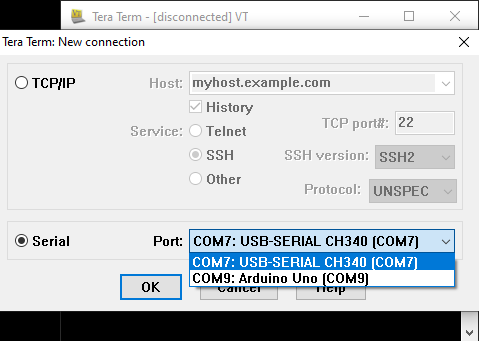
The following steps show you how to display multiple serial outputs. When you first open the Tera Term software you can choose what connection you want to establish. We want to display serial outputs and therefore choose the second option. From here you can choose different ports. In my case I have an Arduino Uno (COM9) and an Arduino Nano (COM7) connection via USB to my computer. For the initial connection I choose the COM7 to display the serial output of the Arduino Nano. Choose your port and click OK to start the application.
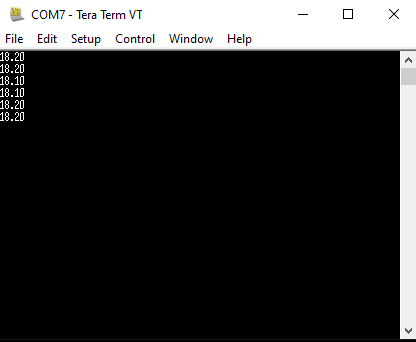
Now you should see the serial output in the application. In my case I display the temperature values of a DHT22 module.
Now we also want to see the serial output of the COM9 port. Therefore we establish a new connection with “File” → “New Connection…” in the menu bar.
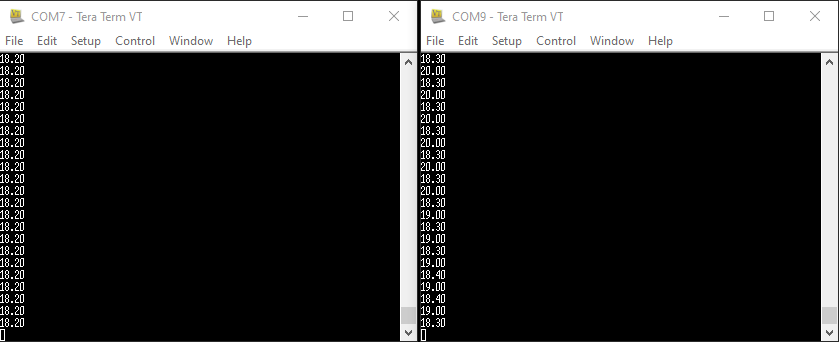
Now we choose our second connection the COM9 port and a second window opens showing the results of the Arduino Uno where I connected two different temperature sensors. And this is how you can display the serial output from two different microcontroller.
Conclusion
This short tutorial showed that it is possible to display multiple serial outputs from different microcontroller with the Tera Term software. Maybe in the future you run into a use chase where you need this feature and will not find it in the Arduino IDE. If you have any questions about this tutorial, feel free to use the comment section below.
We use cookies to ensure that we give you the best experience on our website. If you continue to use this site we will assume that you are happy with it. You can find further information on this under Privacy-Policy





Leave A Comment